← Lab
SwiftUI 모디파이어
스터디2025.07.12
- SwiftUI
- Swift
SwiftUI 모디파이어(Modifier)란?
모디파이어란?
SwiftUI의 모디파이어(Modifier)는 뷰의 외형, 동작, 레이아웃을 변경하는 메서드이다.
모디파이어는 **체이닝 방식**으로 연결하고 사용할 수 있다.
주요 특징
- 불변성(Immutable): 기존 뷰를 수정하지 않고 새로운 뷰 반환
- 순서 중요: 적용 순서에 따라 결과가 달라짐
- 체이닝: 여러 모디파이어를 연속으로 적용 가능
기본 사용법
Text("Hello, World!")
    .font(.title)
    .foregroundColor(.blue)
    .padding()
    .background(Color.yellow)
    .cornerRadius(10)
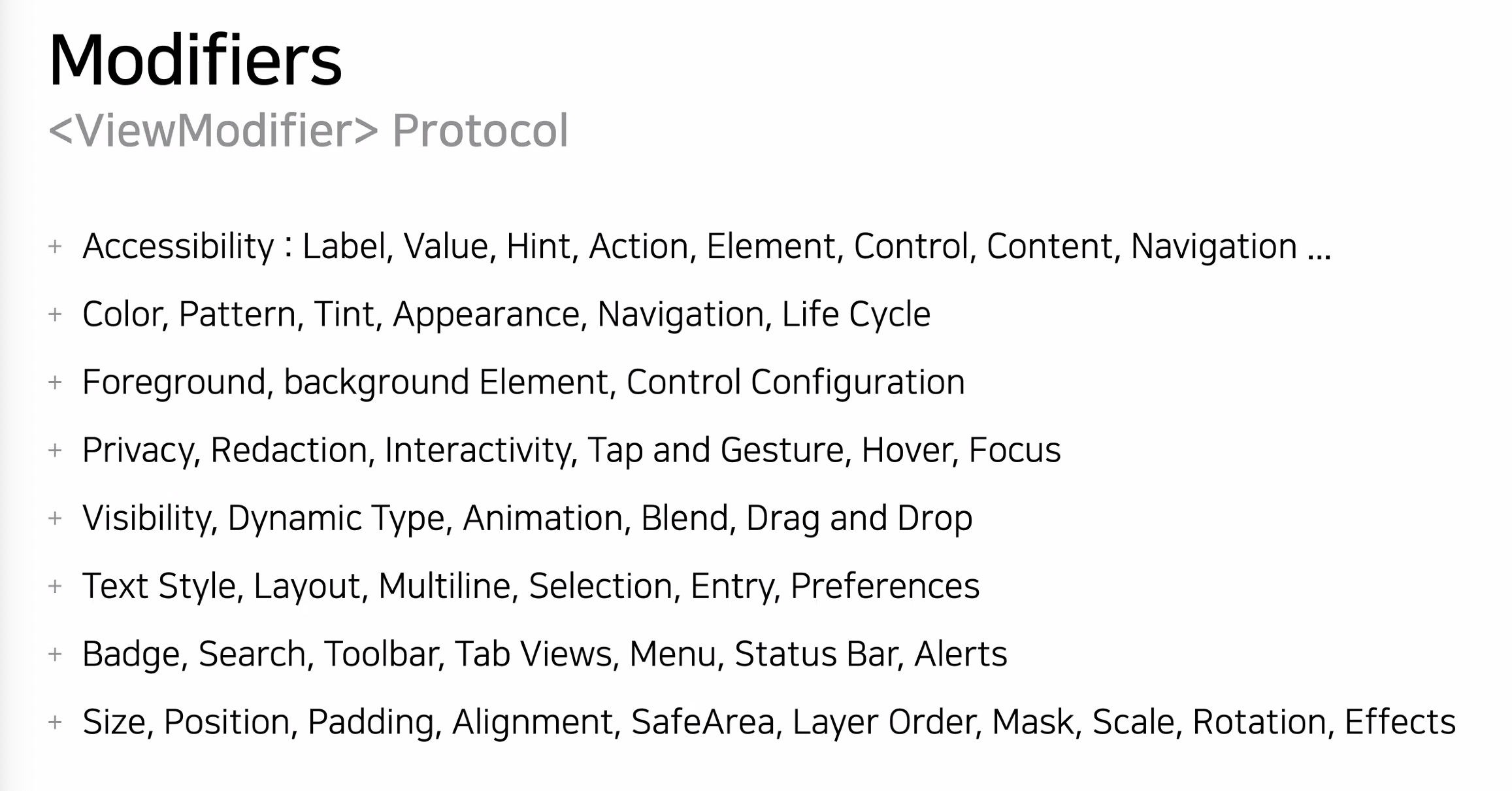
대표적인 모디파이어 분류
1. 텍스트 스타일링
| 모디파이어 | 설명 | 예시 |
|---|---|---|
.font() | 폰트 크기와 스타일 설정 | .font(.title), .font(.system(size: 20)) |
.fontWeight() | 폰트 두께 설정 | .fontWeight(.bold), .fontWeight(.light) |
.foregroundColor() | 텍스트 색상 설정 | .foregroundColor(.red) |
.foregroundStyle() | 그라디언트 등 스타일 적용 (iOS 15+) | .foregroundStyle(.blue.gradient) |
.italic() | 이탤릭체 적용 | .italic() |
.underline() | 밑줄 추가 | .underline(true, color: .red) |
.strikethrough() | 취소선 추가 | .strikethrough(true, color: .gray) |
.kerning() | 자간 조정 | .kerning(2) |
.lineSpacing() | 줄 간격 조정 | .lineSpacing(10) |
.multilineTextAlignment() | 다중 줄 정렬 | .multilineTextAlignment(.center) |
2. 레이아웃
| 모디파이어 | 설명 | 예시 |
|---|---|---|
.frame() | 뷰의 크기 지정 | .frame(width: 100, height: 50) |
.padding() | 여백 추가 | .padding(), .padding(.horizontal, 20) |
.offset() | 위치 이동 | .offset(x: 10, y: 20) |
.position() | 절대 위치 지정 | .position(x: 100, y: 100) |
.aspectRatio() | 비율 유지 | .aspectRatio(16/9, contentMode: .fit) |
.edgesIgnoringSafeArea() | Safe Area 무시 | .edgesIgnoringSafeArea(.all) |
.ignoresSafeArea() | Safe Area 무시 (iOS 14+) | .ignoresSafeArea() |
.fixedSize() | 이상적인 크기로 고정 | .fixedSize(horizontal: true, vertical: false) |
.layoutPriority() | 레이아웃 우선순위 | .layoutPriority(1) |
3. 배경 및 테두리
| 모디파이어 | 설명 | 예시 |
|---|---|---|
.background() | 배경 추가 | .background(Color.blue) |
.overlay() | 오버레이 추가 | .overlay(Circle().stroke(Color.red)) |
.border() | 테두리 추가 | .border(Color.black, width: 2) |
.cornerRadius() | 모서리 둥글게 | .cornerRadius(10) |
.clipShape() | 특정 모양으로 자르기 | .clipShape(Circle()) |
.shadow() | 그림자 추가 | .shadow(radius: 5, x: 2, y: 2) |
.opacity() | 투명도 설정 | .opacity(0.5) |
.blur() | 블러 효과 | .blur(radius: 3) |
4. 상호작용
| 모디파이어 | 설명 | 예시 |
|---|---|---|
.onTapGesture() | 탭 제스처 감지 | .onTapGesture { print("Tapped") } |
.onLongPressGesture() | 롱 프레스 감지 | .onLongPressGesture { } |
.gesture() | 커스텀 제스처 추가 | .gesture(DragGesture()) |
.disabled() | 상호작용 비활성화 | .disabled(true) |
.buttonStyle() | 버튼 스타일 적용 | .buttonStyle(.bordered) |
.alert() | 알림 표시 | .alert("Title", isPresented: $showAlert) { } |
.sheet() | 모달 시트 표시 | .sheet(isPresented: $showSheet) { } |
.confirmationDialog() | 확인 대화상자 (iOS 15+) | .confirmationDialog("Title", isPresented: $show) { } |
5. 애니메이션
| 모디파이어 | 설명 | 예시 |
|---|---|---|
.animation() | 애니메이션 적용 | .animation(.easeInOut, value: isAnimated) |
.transition() | 전환 효과 | .transition(.slide) |
.rotationEffect() | 회전 효과 | .rotationEffect(.degrees(45)) |
.scaleEffect() | 크기 변환 | .scaleEffect(1.5) |
.matchedGeometryEffect() | 뷰 간 애니메이션 연결 (iOS 14+) | .matchedGeometryEffect(id: "hero", in: namespace) |
6. 환경 및 상태
| 모디파이어 | 설명 | 예시 |
|---|---|---|
.environmentObject() | 환경 객체 주입 | .environmentObject(settings) |
.environment() | 환경 값 설정 | .environment(\.locale, Locale(identifier: "ko")) |
.accentColor() | 강조 색상 설정 | .accentColor(.green) |
.preferredColorScheme() | 색상 스킴 강제 | .preferredColorScheme(.dark) |
.onAppear() | 뷰 나타날 때 실행 | .onAppear { print("Appeared") } |
.onDisappear() | 뷰 사라질 때 실행 | .onDisappear { print("Disappeared") } |
.task() | 비동기 작업 (iOS 15+) | .task { await loadData() } |
7. 리스트 및 네비게이션
| 모디파이어 | 설명 | 예시 |
|---|---|---|
.listStyle() | 리스트 스타일 설정 | .listStyle(.insetGrouped) |
.listRowBackground() | 리스트 행 배경 | .listRowBackground(Color.blue) |
.navigationTitle() | 네비게이션 타이틀 | .navigationTitle("Title") |
.navigationBarTitleDisplayMode() | 타이틀 표시 모드 | .navigationBarTitleDisplayMode(.inline) |
.toolbar() | 툴바 아이템 추가 | .toolbar { ToolbarItem { } } |
.tabItem() | 탭바 아이템 설정 | .tabItem { Label("Home", systemImage: "house") } |
8. 접근성
| 모디파이어 | 설명 | 예시 |
|---|---|---|
.accessibilityLabel() | 접근성 레이블 | .accessibilityLabel("Submit button") |
.accessibilityHint() | 접근성 힌트 | .accessibilityHint("Double tap to submit") |
.accessibilityValue() | 접근성 값 | .accessibilityValue("50%") |
.accessibilityHidden() | 접근성에서 숨기기 | .accessibilityHidden(true) |
모디파이어 순서의 중요성
모디파이어의 적용 순서에 따라 결과가 달라진다.
// 예시 1: 패딩 후 배경
Text("Hello")
    .padding()
    .background(Color.yellow)
// 결과: 노란색 배경이 패딩 영역 포함

// 예시 2: 배경 후 패딩
Text("Hello")
    .background(Color.yellow)
    .padding()
// 결과: 노란색 배경이 텍스트만, 패딩은 투명
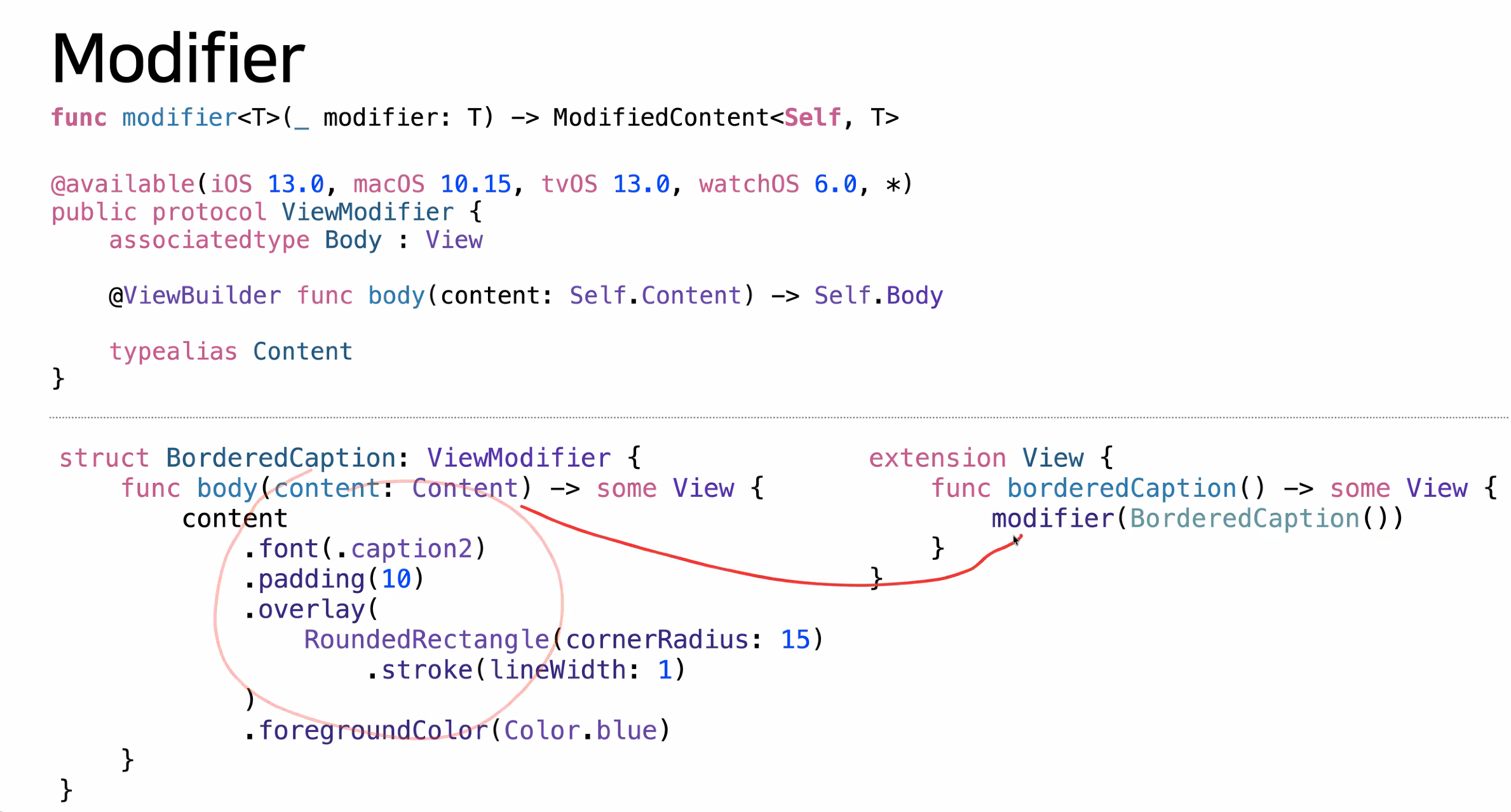
커스텀 모디파이어 만들기
자주 사용하는 스타일을 재사용 가능한 커스텀 모디파이어로 만들 수 있다.
struct PrimaryButtonStyle: ViewModifier {
    func body(content: Content) -> some View {
        content
            .font(.headline)
            .foregroundColor(.white)
            .padding()
            .background(Color.blue)
            .cornerRadius(10)
    }
}

extension View {
    func primaryButtonStyle() -> some View {
        modifier(PrimaryButtonStyle())
    }
}

// 사용
Button("Submit") { }
    .primaryButtonStyle()
카테고리별 빠른 참조
| 카테고리 | 주요 모디파이어 |
|---|---|
| 텍스트 | font, foregroundColor, bold, italic, underline |
| 레이아웃 | frame, padding, offset, spacing |
| 시각 효과 | background, border, cornerRadius, shadow, opacity |
| 상호작용 | onTapGesture, gesture, disabled, buttonStyle |
| 애니메이션 | animation, transition, rotationEffect, scaleEffect |
| 네비게이션 | navigationTitle, toolbar, tabItem |
| 상태 관리 | onAppear, onDisappear, task, onChange |
| 접근성 | accessibilityLabel, accessibilityHint |